
SAP Table VBPA
Sales Document: Partner
What Is the SAP VBPA Table?
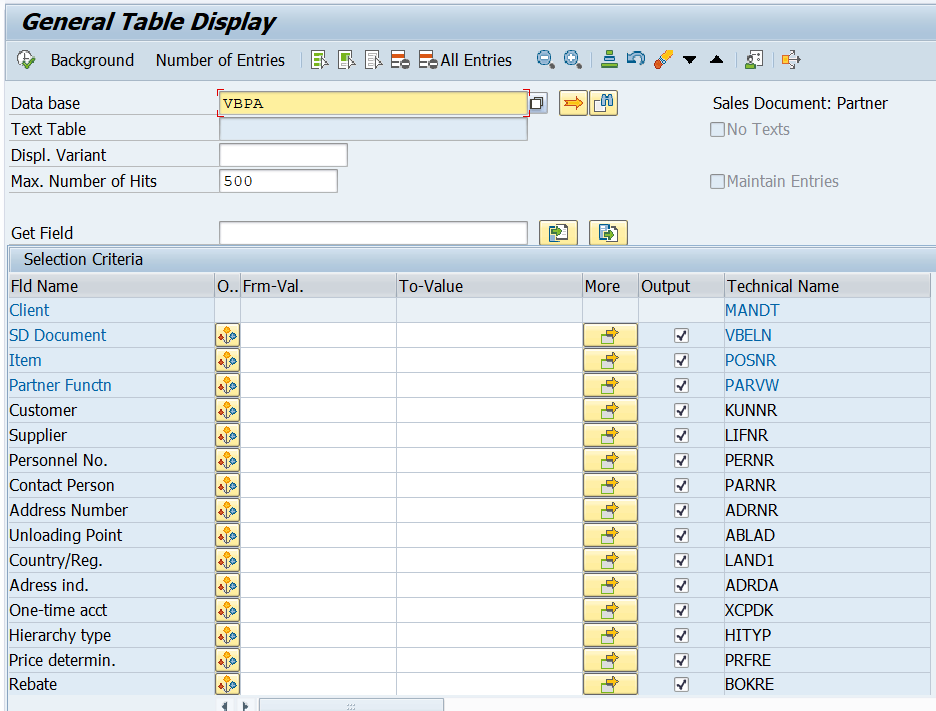
SAP VBPA Table stores sales document partner data in SAP Sales and Distribution (SD). It records the business partners assigned to Sales orders, Quotations, Contracts and other sales documents.
In SAP SD, partner functions identify the roles that business partners perform during sales transactions:
- Sold-to-party: The customer who places an order
- Ship-to-party: The customer who receives the order
- Bill-to-party: The customer who receives the invoice
- Payer: The customer who pay the invoice.
Partner assignments can be maintained at document header and item level.
The important information in VBPA includes:
- Sales document number
- Item number
- Partner function
- Customer number
- Address number
How the partners are determined in Sales Documents?
When a user enters the sold-to-party in a Sales Order creation screen, the SAP determines other partners from customer partners assignment for the relevant sales area. These customer master assignments are maintained in KNVP.
The partner determination settings control which partner functions are required and where partners are determined.
Practical Example:
Customer C1000 placed an order for material M1001, but the material must be delivered to Customer C2000.
In the C1000 customer master, C2000 is assigned as the ship to party. When the user creates the sales order and enter C1000 as sold to party, SAP determines C2000 as the ship to party according to the partner determination settings to deliver the materials.
The bill to party and payer are also determined in sales order from the relevant partner assignments. After sales order is saved, these document level partner details are stored in VBPA table.
Sales document and customer partner information is maintained in several tables, including
- KNVP: Customer master partner functions
- VBAK: Sales document – Header data
- VBAP: Sales document – Item data
- VBPA: Sales Document – Partner data
- VBKD: Sales Document – Business data
- VBEP: Sales Document – Scheduled line data
- VBFA: Sales Document – Flow s
Tip: KNVP table shows the partner assignments maintained in the customer master, while VBPA table shows the partners assigned to a particular sales document.
SAP consultants, users and support teams use VBPA table to review document partner assignments and troubleshoot issues related to partner determinations in sales documents.
Quick overview
| SAP table | VBPA |
|---|---|
| Short description | Sales Document: Partner |
| Table type | Transparent table |
| Primary key | MANDT (Client), VBELN (Sales and Distribution Document Number), POSNR (Item number of the SD document), PARVW (Partner Function) |
| Client-dependent | Yes |
At a glance
- Module
- Sales and Distribution SD
- Application component
- BASIC FUNCTIONS SD-BF
Technical details
- Delivery class
- A (Application table: master and transaction data)
- Data class
- APPL1 (Transaction Data, Transparent Tables)
- Package
- Application development R/3 RV central functions (VZ)
Primary key fields
| Field | Description | Data element | Type | Length |
|---|---|---|---|---|
MANDT
|
Client | MANDT | CLNT | 3 |
VBELN
|
Sales and Distribution Document Number | VBELN | CHAR | 10 |
POSNR
|
Item number of the SD document | POSNR | NUMC | 6 |
PARVW
|
Partner Function | PARVW | CHAR | 2 |
Table fields
31 fields
31 fields
| Field | Description | Data element | Domain | Type | Length | Decimals | Check table |
|---|---|---|---|---|---|---|---|
MANDT
Key
|
Client | MANDT | MANDT | CLNT | 3 | — | T000 |
VBELN
Key
|
Sales and Distribution Document Number | VBELN | VBELN | CHAR | 10 | — | |
POSNR
Key
|
Item number of the SD document | POSNR | POSNR | NUMC | 6 | — | |
PARVW
Key
|
Partner Function | PARVW | PARVW | CHAR | 2 | — | TPAR |
KUNNR
|
Customer Number | KUNNR | KUNNR | CHAR | 10 | — | KNA1 |
LIFNR
|
Account Number of Supplier | LIFNR | LIFNR | CHAR | 10 | — | LFA1 |
PERNR
|
Personnel Number | PERNR_D | PERNR | NUMC | 8 | — | |
PARNR
|
Number of Contact Person | PARNR | PARNR | NUMC | 10 | — | |
ADRNR
|
Address Number | AD_ADDRNUM | AD_ADDRNUM | CHAR | 10 | — | |
ABLAD
|
Unloading Point | ABLAD | TEXT25 | CHAR | 25 | — | |
LAND1
|
Country/Region Key | LAND1 | LAND1 | CHAR | 3 | — | T005 |
ADRDA
|
Address indicator | ADRDA | ADRDA | CHAR | 1 | — | |
XCPDK
|
Indicator: Is the account a one-time account? | XCPDK | XFELD | CHAR | 1 | — | |
HITYP
|
Customer hierarchy type | HITYP_KH | HITYP | CHAR | 1 | — | THIT |
PRFRE
|
Relevant for price determination ID | PRFRE | XFELD | CHAR | 1 | — | |
BOKRE
|
Indicator: Customer Is Rebate-Relevant | BOKRE | XFELD | CHAR | 1 | — | |
HISTUNR
|
Level number within hierarchy | HISTUNR | NUM2 | NUMC | 2 | — | |
KNREF
|
Customer description of partner (plant, storage location) | KNREF | KNREF | CHAR | 30 | — | |
LZONE
|
Transportation zone to or from which the goods are delivered | LZONE | ZONE | CHAR | 10 | — | |
HZUOR
|
Assignment to Hierarchy | HZUOR | HZUOR | NUMC | 2 | — | |
STCEG
|
VAT Registration Number | STCEG | STCEG | CHAR | 20 | — | |
PARVW_FF
|
Indicator 'further partners in this function' (VBPA2) | PARTNER_FF | XFELD | CHAR | 1 | — | |
ADRNP
|
Person Number | AD_PERSNUM | AD_PERSNUM | CHAR | 10 | — | ADRP |
KALE
|
Maintain appointments in calendar | KALE | KALE | CHAR | 1 | — | |
_DATAAGING
|
Data Filter Value for Data Aging | DATA_TEMPERATURE | DATA_TEMPERATURE | DATS | 8 | — | |
ASSIGNED_BP
|
Business Partner Number | BU_PARTNER | BU_PARTNER | CHAR | 10 | — | BUT000 |
ADDR_OPERATION
|
Address Determination in Document | SD_ADDR_OPERATION | BU_OPERATION | CHAR | 6 | — | TB008S |
ADDR_TYPE
|
Address type (1=Organization, 2=Person, 3=Contact person) | AD_ADRTYPE | AD_ADRTYPE | CHAR | 1 | — | |
BP_REF_ADRNR
|
BP Reference Address Number | SDPD_BP_REF_ADDRNUM | AD_ADDRNUM | CHAR | 10 | — | |
DUMMY_SDDOCPARTNER_INCL_EEW_PS
|
Dummy function in length 1 | DUMMY | DUMMY | CHAR | 1 | — | |
SDM_VERSION
|
SDM: Version field for VBPA | SD_SDM_VERSION_VBPA | SD_SDM_VERSION_VBPA | CHAR | 2 | — |
No fields match the selected filters.
SAP VBPA Table Availability
| SAP product | Verified release/system | Table availability | Verified on |
|---|---|---|---|
| SAP S/4HANA | 2023 - On-Premise | Available |
Editorial and verification
- Content editor
- ERPSAP Content Team
- Technical reviewer
- ERPSAP Technical Review Team
- Verified against
- SAP S/4HANA 2023 On-Premise system
- Last updated
- October 27, 2026
The information on this SAP VBPA table page is based on the verified SAP S/4HANA 2023 on-premise system identified above. Table definitions, fields, and availability may differ across SAP releases and customer-specific systems.